
WebCam-Control-Center
7.2.1
Size: 1 MB
Downloads: 4980
Platform: Windows (All Versions)

Basic web cam functions are never enough. You can find applications which add a few effects, but nothing that can keep you interested long enough. Using WebCam Control Center, you will have access to a wide range of interesting features that no basic software can offer. From basic recording functions to rigging a security system, you can do it all from one simple interface.
The program is small when it comes to its size on your disk. It's under one Mb, so downloading it should not be a challenge to any Internet connection, no matter how slow it is. Installing it won't take up much of your time. The wizard won't hinder you with anything but basic installation prompts.
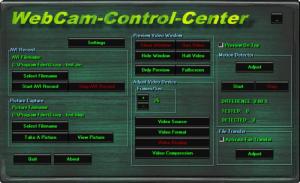
The interface is a small, green window, full of buttons that you can use to manipulate your web cam. They are all placed in separate boxes according to their function in order to make them easier to find. You can perform basic tasks like start recording video or take a picture, start or stop the web cam and make some adjustments regarding video format, compression, source and display.
If you long for advanced settings, organized on tabs, you can rest easy because you can find three separate buttons with their own sets of settings. First there's the program's main settings window. Here you can find options for startup, drivers, picture settings, AVI recording and adding an IP-Cam.
This is not all that WebCam Control Center has to offer. An interesting trick up its sleeve is a motion detector. You can tune it according to your will using the Adjust button in the Motion Detector area (on the main interface). The settings you can make to this feature cover everything you need. But the main option you would be most interested in is selecting a certain area of the web cam's picture. This involves just clicking and dragging over a preview of the web cam's output. Anyone caught in this area of the web cam's view will trigger an action of your choosing like playing a sound, sending an email, taking a picture or AVI recording. Most of these actions can be activated by clicking their designated check boxes from the Action At Detection tab. Alternatively, you can check "Protocol Generation" and then go to the tab with the same name for additional settings.
WebCam Control Center also supports file transferring. In this features area on the interface you'll find another Adjust button that will open up a tabbed settings window. Here you will find settings regarding DialUp, FTP and e-mail sending. Additionally, you can set a certain time period the file transfer should be active.
Pros
The program's features let you do mostly anything with a web cam. Everything is neatly arranged on the interface for easy access. Any amateur can make use of it.

Cons
Some interesting features are not available in the trial version. WebCam Control Center lets you turn a simple web cam into a complex recording system which you can use for security or other reasons.

WebCam-Control-Center
7.2.1
Download
WebCam-Control-Center Awards

WebCam-Control-Center Editor’s Review Rating
WebCam-Control-Center has been reviewed by Frederick Barton on 16 Feb 2012. Based on the user interface, features and complexity, Findmysoft has rated WebCam-Control-Center 4 out of 5 stars, naming it Excellent







